Real Estate Virtual Assistant Checklist: 40 Tasks to Delegate

On This Page
- What Does a Real Estate Virtual Assistant Do?
- Which Real Estate Virtual Assistant Tasks Can You Delegate?
- Which Tasks Must Stay With a Licensed Agent?
- How Do You Set Up a Real Estate Virtual Assistant in the First Two Weeks?
- Which Tasks Should Agents, Teams, and Property Managers Delegate First?
- When Is a Real Estate Virtual Assistant Not the Right Fit?
- Frequently Asked Questions
Real estate virtual assistant tasks are the admin jobs around a sale or rental that do not need a license: MLS data entry, CRM updates, inbound lead follow-up, deadline tracking, showing scheduling, marketing prep, and property management paperwork. Advice, negotiation, showing property, and opinions of value stay with a licensed agent under state rules.
Key takeaways:
- The checklist below has 40 tasks in six areas: listings, CRM, transactions, marketing, showings, and property management.
- State regulators draw the line: in Texas, an unlicensed assistant may book a showing but may not open the door or host the open house.
- Prospecting calls to owners count as licensed activity in Texas, so this checklist covers inbound leads only.
- A good first two weeks gives the assistant written approval rules before any client sees their work.
This checklist is for agents, teams, brokerages, and property managers deciding what to hand off first, with the license line and a two-week setup plan. If you are still deciding whether outsourcing fits your office at all, the trade-offs of outsourcing real estate work come first.
What Does a Real Estate Virtual Assistant Do?
A real estate virtual assistant keeps the paperwork, data, and calendars moving so licensed agents spend their hours with clients. The work falls into six areas, and each has a clear limit set by licensing law.
Software now does much of the drafting. In the 2026 REALTORS® Technology Report, the National Association of REALTORS® (NAR) found that 81% of members adopt new technology mainly to improve efficiency, 75% of AI users use it to write listing descriptions, and 52% use it to draft emails and follow-ups. Someone still has to check the square footage against the tax record, enter the listing correctly, and log every reply in the CRM. That checking and logging is where a dedicated real estate virtual assistant earns their seat.
| Area | Tasks on the list | Typical tools | Stays with the licensed agent |
|---|---|---|---|
| Listings and MLS | 7 | Your MLS, Zillow, Realtor.com | Pricing advice and opinions of value |
| CRM and lead follow-up | 8 | Follow Up Boss, kvCORE, Lofty | Qualifying buyers and giving advice |
| Transaction admin | 8 | Dotloop, SkySlope, DocuSign | Reviewing and negotiating contracts |
| Marketing and social | 6 | Canva, Mailchimp | Final approval of every ad |
| Showing scheduling | 5 | ShowingTime, Google Calendar | Showing the home and hosting open houses |
| Property management admin | 6 | AppFolio, Buildium, Yardi | Leasing decisions and trust account control |
Which Real Estate Virtual Assistant Tasks Can You Delegate?
You can delegate any task that is clerical, scheduled, or done from data a licensed agent supplies. Here are 40 of them, grouped by area, with the agent's approval step noted where it matters.
Listings and MLS Data Entry (Tasks 1 to 7)
- Enter new listings into the MLS from the agent's intake sheet, with the double-check routine used in outsourced data entry.
- Update price, status, and showing instructions the day the agent sends them.
- Upload photos, floor plans, and virtual tour links.
- Check each listing on Zillow and Realtor.com and report mismatches.
- Draft listing descriptions from the agent's notes for the agent to edit and approve.
- Pull tax records and deeds for the listing file.
- Pull MLS comparables into a draft comparative market analysis that the agent prices and signs.
CRM and Lead Follow-Up (Tasks 8 to 15)
- Log every inbound lead from portals, your website, and sign calls into the CRM.
- Tag leads by source, area, and price range, then assign them under your routing rules.
- Send agent-approved first-reply emails and texts to inbound leads.
- Run long-term nurture campaigns for leads who are not ready to move.
- Book a call with an agent when a lead asks to talk, without qualifying the buyer.
- Merge duplicate contacts and fill missing details.
- Send past-client home anniversary notes and holiday cards.
- Prepare a weekly report of leads by source and agent response time.
Transaction Coordination Admin (Tasks 16 to 23)
- Open each new deal file in Dotloop or SkySlope with your brokerage checklist.
- Put every contract deadline (inspection, appraisal, financing, closing) on a shared calendar.
- Send the agent reminders three days and one day before each deadline.
- Route documents for signature through DocuSign as directed and chase missing initials.
- Request status updates from the lender, title company, and escrow officer.
- Schedule inspections, appraisals, and the final walk-through.
- Keep the file complete for broker compliance review before closing.
- After closing, order the closing gift, send the review request, and archive the file.
Marketing and Social Media (Tasks 24 to 29)
- Schedule posts from an approved content calendar, the same routine a social media virtual assistant runs in other industries.
- Build just-listed, just-sold, and open house graphics in Canva from your templates.
- Assemble the monthly email newsletter in Mailchimp for the agent's sign-off.
- Update website listing pages and agent bios.
- Compile monthly market numbers from MLS data so the agent can add the commentary.
- Request reviews from closed clients and post approved ones to your profiles.
Showing Scheduling (Tasks 30 to 34)
- Book showing requests with sellers or tenants through ShowingTime or your own calendar.
- Confirm each showing with the buyer's agent and occupant the day before.
- Build the agent's daily showing route.
- Collect feedback from buyer's agents after each showing and summarize it for the listing agent.
- Put open houses on the calendar and order signs and flyers, with a licensed agent hosting.
Property Management Admin (Tasks 35 to 40)
- Log tenant maintenance requests and dispatch them to approved vendors in AppFolio, Buildium, or Yardi.
- Send rent reminders and record payments, without control over the trust account.
- Track lease expirations and prepare renewal notices for the manager to approve.
- Schedule move-in and move-out inspections.
- Prepare draft owner statements for the manager's review, following the property management accounting your bookkeeper sets.
- Keep vendor W-9s and insurance certificates current on file.
Which Tasks Must Stay With a Licensed Agent?
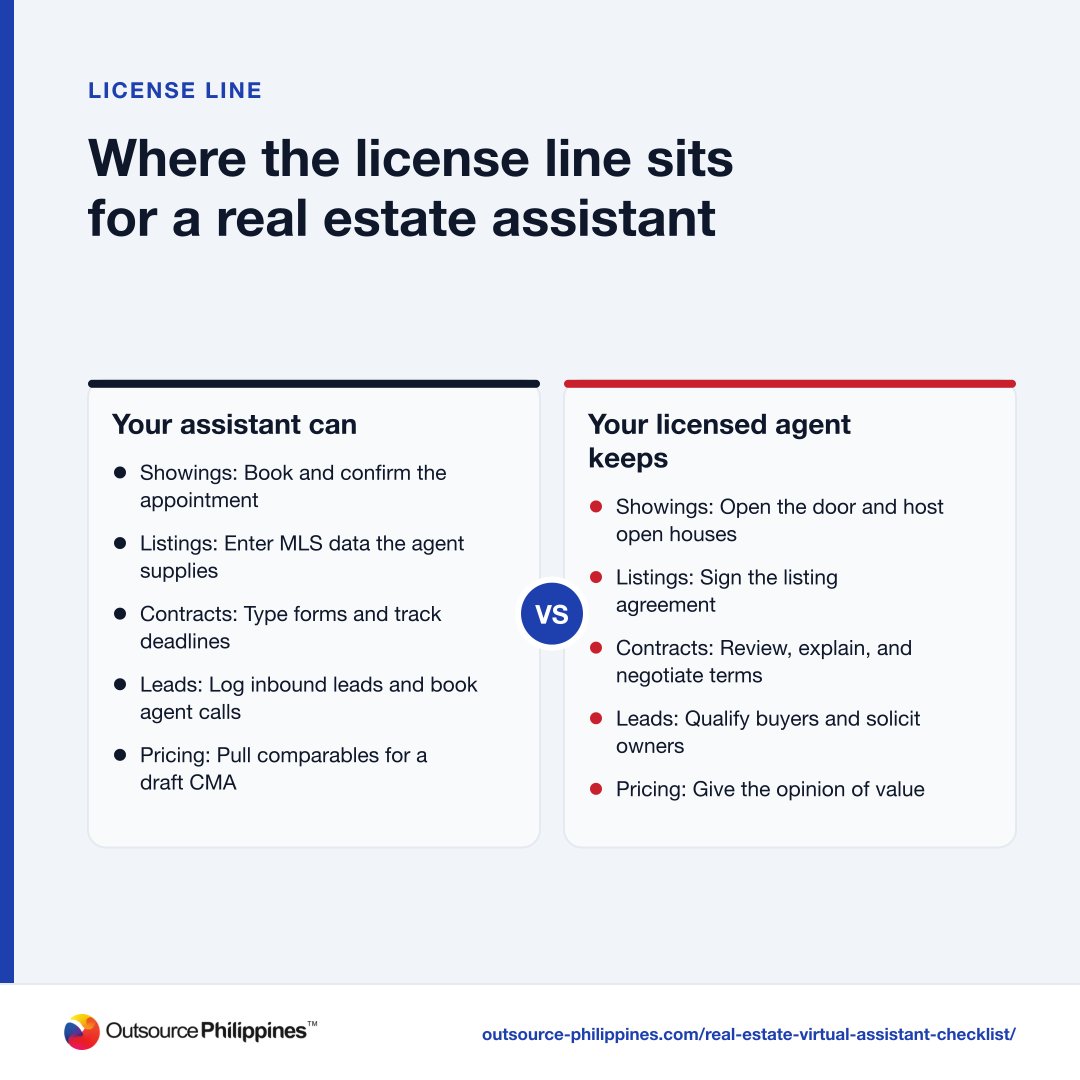
Anything that requires a license in your state stays with a licensed agent: showing property, negotiating, advice, opinions of value, soliciting listings, and reviewing contracts. The assistant handles the admin around those acts.
The Texas Real Estate Commission (TREC) spells this out in its guidance on using unlicensed assistants. An assistant may set showing appointments and confirm facts already advertised, such as bedroom count or price. An assistant may not open a door for a buyer, host an open house, review a contract, or call owners to ask whether they want to sell. TREC adds that unlicensed brokerage activity is a Class A misdemeanor for the assistant and for the license holder who employs them, with a fine of up to $4,000, up to a year in jail, or both.
Other states draw similar lines in their own words. The North Carolina Real Estate Commission's bulletin on what unlicensed assistants can do allows them to submit MLS listings only from data a broker supplies, type contract forms with broker-provided information, and schedule showings. It also tells brokers to explain those limits to clients early, because clients do not always know who holds a license.
Your assistant can
- Showings
- Book and confirm the appointment
- Listings
- Enter MLS data the agent supplies
- Contracts
- Type forms and track deadlines
- Leads
- Log inbound leads and book agent calls
- Pricing
- Pull comparables for a draft CMA
Your licensed agent keeps
- Showings
- Open the door and host open houses
- Listings
- Sign the listing agreement
- Contracts
- Review, explain, and negotiate terms
- Leads
- Qualify buyers and solicit owners
- Pricing
- Give the opinion of value
Money follows the same rule. TREC allows unlicensed staff to keep the books, but only a license holder may withdraw or transfer funds from a brokerage trust account. Earnest money, security deposits, and commission splits all touch that account, so your real estate accounting setup should give the assistant view access and data entry rights, not signing authority.
Outbound prospecting is the clearest gray area. Wholesalers build their business on calls to owners, which is why a wholesaling virtual assistant is scoped differently from the agent-side work on this list. Rules vary by state, so confirm each task with your managing broker or state commission before you assign it.
How Do You Set Up a Real Estate Virtual Assistant in the First Two Weeks?
Start with written rules and narrow access, then widen both as accuracy holds. Moving from shadowing to supervised work to owned tasks keeps mistakes away from clients.
- Days 1 to 2: access and rules. Create named logins for the CRM, MLS (if your MLS permits assistant access), transaction software, and email. Write the approval rules: what the assistant sends alone, what needs agent sign-off, and what they never do.
- Days 3 to 4: shadowing. Record short screen videos of how you enter a listing, open a deal file, and log a lead. The assistant writes each checklist back in their own words.
- Days 5 to 7: supervised CRM and listing work. Hand over lead logging, tagging, and listing updates first. Review every entry each evening.
- Days 8 to 10: calendars and deadlines. Add showing scheduling and contract date tracking for one or two active deals.
- Days 11 to 14: owned tasks and a weekly report. The assistant owns tasks 1 to 23 for new files, and the agent checks a sample. Agree on a weekly report that lists leads logged, listings updated, showings booked, and open deadlines.
Two rules hold for the whole ramp. Every client-facing template gets agent approval before first use, and the assistant introduces themselves as an unlicensed assistant on calls, which matches the TREC guidance above. The same onboarding pattern applies when you hire a virtual assistant in the Philippines for other roles.
Which Tasks Should Agents, Teams, and Property Managers Delegate First?
Start with the tasks that repeat daily and cost a deal when they slip, usually lead logging and deadline tracking before marketing.
- Solo agents: tasks 8 to 12 and 30 to 32. Inbound leads and showing requests are where missed hours turn into missed buyers.
- Teams: tasks 9, 15, and 16 to 22. Routing rules and a shared deal calendar stop two agents working one lead.
- Brokerages: tasks 1 to 4, 16, and 22. Clean MLS entries and complete files shorten compliance review.
- Property managers: tasks 35 to 40. Maintenance tickets, renewals, and vendor paperwork run on fixed cycles that suit a full-time assistant, and they are the same cycles most property management outsourcing arrangements start with.
The NAR Profile of Home Buyers and Sellers for 2026 found more buyers and sellers relied on an agent or broker than at any point in decades. More clients mean more files and deadlines, the admin load this list moves.
When Is a Real Estate Virtual Assistant Not the Right Fit?
A virtual assistant is the wrong hire when the work requires a license or a person on site.
- You need someone to show homes or host open houses. Hire a licensed showing agent or a buyer's agent instead.
- You need cold calling of owners for listings. Several states treat that as licensed solicitation, as TREC does.
- You want the assistant to control trust funds. Signing authority on trust accounts stays with a license holder.
- You close only a few deals a year. A full-time assistant would sit idle; software or a part-time local hire fits better.
- Your systems are not written down. An assistant follows a process but cannot invent your approval rules.
Outsource Philippines™ sources, tests, and shortlists real estate assistants, the client's team joins the final interviews and makes the hiring decision, and each assistant works full time on one client's account from our supervised office in San Pedro City, Laguna.
Frequently Asked Questions
Can a Real Estate Virtual Assistant Make Cold Calls?
It depends on the state, and in some states the answer is no. The Texas Real Estate Commission treats calls asking owners whether they want to buy or sell as solicitation that requires a license. A virtual assistant can still respond to inbound leads, send approved follow-up messages, and book calls with an agent.
Can a Virtual Assistant Do Transaction Coordination?
A virtual assistant can handle the administrative side of transaction coordination. That includes opening deal files, tracking contract deadlines, routing documents for signature, chasing missing paperwork, and updating the lender and title company. Reviewing contract terms, explaining them to clients, and negotiating repairs or price changes stay with a licensed agent under rules like those of the Texas Real Estate Commission.
Can a Real Estate Virtual Assistant Write Listing Descriptions?
Yes, as a draft for the agent to approve. The assistant works from the agent's notes, the property records, and the photos, and the agent edits and publishes the final copy. That approval step matters because the brokerage answers for advertising accuracy. Keep a short style sheet with required disclosures.
How Do You Train a Real Estate Virtual Assistant?
Train with recorded screen walkthroughs, a written checklist for each task, and a daily review during the first two weeks. Start with low-risk work such as CRM logging and listing updates, then add calendars and deal files once accuracy holds. Every client-facing template needs agent approval before first use, and the assistant should identify as unlicensed on calls.
What Tools Does a Real Estate Virtual Assistant Need Access To?
Most need the CRM, the transaction platform, a shared calendar, email, and a design tool such as Canva. MLS access depends on your MLS rules, since some allow assistant logins and some do not. Property managers add AppFolio, Buildium, or Yardi. Give each assistant a named login rather than a shared password, so every change has an owner.