What Is Bookkeeping? Essential Insights and Benefits for Your Business

On This Page
- What Is Bookkeeping?
- What Is the Difference Between a Bookkeeper and an Accountant?
- Why Does Bookkeeping Matter for a Business?
- What Are the Two Methods of Bookkeeping?
- How Are Bookkeeping Entries Recorded?
- Which Financial Statements Come From Bookkeeping?
- Which Bookkeeping Software Do Small Businesses Use?
- What Are the Best Practices for Accurate Bookkeeping?
- What Qualifications Should a Bookkeeper Have?
- Should You Keep Bookkeeping In-House or Outsource It?
- Frequently Asked Questions
Bookkeeping is the record of every dollar that enters or leaves a business: each sale, bill, payroll run and bank fee, entered in the right account on the right date. The US Bureau of Labor Statistics counted about 1.53 million bookkeeping, accounting and auditing clerks in 2025, with a median pay of $50,670 (May 2025).
Clean books decide how fast you can file taxes, answer a lender or spot a cash shortfall. Below are the two bookkeeping methods, how entries become financial statements, the software most small businesses use, and the habits that keep the records accurate, whether the work stays in-house or goes to an outsourced bookkeeping team.
What Is Bookkeeping?
Bookkeeping is the day-to-day recording and organizing of a business's financial transactions: sales, purchases, payments, receipts and payroll. Each entry goes into an account in the general ledger, and those balances produce the income statement, balance sheet and cash flow statement that owners, lenders and tax preparers rely on.
A bookkeeper keeps three sets of records current:
- Accounts payable: bills your business owes to suppliers and when each is due
- Accounts receivable: invoices your customers owe you and which are paid
- General ledger: the master record of every account, from cash to loans to sales
Good bookkeeping for small businesses also keeps business and personal money apart. IRS Publication 583, its guide for new businesses, tells owners to keep a business account separate from their personal checking account and use it for business only. Mixed accounts are the most common reason a year-end cleanup takes weeks.
What Is the Difference Between a Bookkeeper and an Accountant?
A bookkeeper records what happened. An accountant reads those records, prepares financial statements and tax returns, and advises on what to do next. Most small businesses need a bookkeeper every week and an accountant at month end, quarter end and tax time.
| Point of Difference | Bookkeeper | Accountant |
|---|---|---|
| Main job | Records transactions as they happen | Analyzes and reports on the records |
| Typical tasks | Entering bills and sales, reconciling bank accounts, running payroll | Adjusting entries, financial statements, tax returns, budgets |
| How often | Daily or weekly | Monthly, quarterly and yearly |
| Credentials | Not required; certification is optional | Often a CPA license for audit and attest work |
The two jobs depend on each other. An accountant's tax return or cash forecast is only as good as the ledger behind it, which is why many companies hire both through one provider of outsourced accounting services.
Why Does Bookkeeping Matter for a Business?
Up-to-date books pay off in four places:
- Taxes: the IRS expects records that support every income and expense item on a return, and it can ask for them years later (see the retention table below).
- Cash: a weekly view of receivables and payables shows a shortfall before payroll day, not after.
- Financing: lenders and investors ask for financial statements and bank reconciliations before they commit money.
- Decisions: you can see which products, customers or locations make money and which only add revenue.
How long to keep the records depends on the situation. These are the periods the IRS gives in How Long Should I Keep Records?
| Situation | Keep Records For |
|---|---|
| Most tax returns | 3 years |
| Employment tax records | 4 years after the tax is due or paid |
| Income underreported by more than 25% of gross income | 6 years |
| Bad debt deduction or worthless securities loss | 7 years |
| No return filed, or a fraudulent return | Indefinitely |
What Are the Two Methods of Bookkeeping?
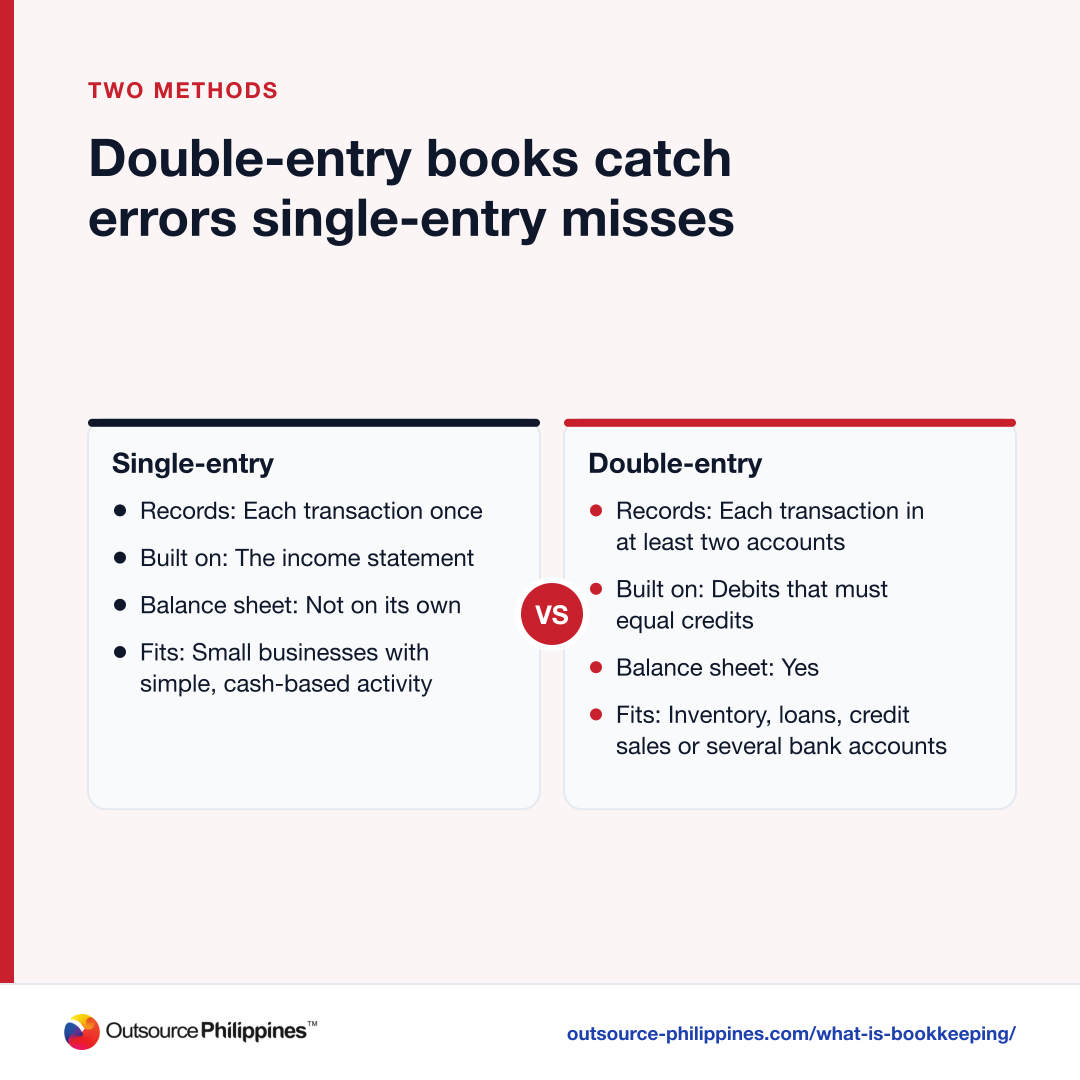
Single-entry bookkeeping records each transaction once, like a checkbook register. If you buy $200 of supplies, you list a $200 expense. IRS Publication 583 describes it as a system built on the income statement and practical for a small business with simple, cash-based activity. It cannot produce a balance sheet on its own, and errors are hard to find.
Double-entry bookkeeping records every transaction in at least two accounts, one debit and one credit. The same $200 purchase increases supplies expense (debit) and reduces cash (credit). Because debits must equal credits, the system has what the IRS calls built-in checks and balances. Any business with inventory, loans, credit sales or more than one bank account should use it, and every mainstream accounting package does.
Single-entry
- Records
- Each transaction once
- Built on
- The income statement
- Balance sheet
- Not on its own
- Fits
- Small businesses with simple, cash-based activity
Double-entry
- Records
- Each transaction in at least two accounts
- Built on
- Debits that must equal credits
- Balance sheet
- Yes
- Fits
- Inventory, loans, credit sales or several bank accounts
A separate choice is when to record income and expenses. The US Small Business Administration explains that the cash method records a sale when payment arrives, while the accrual method records it when the sale is made. Accrual gives a truer picture of profit; cash is simpler to run.
How Are Bookkeeping Entries Recorded?
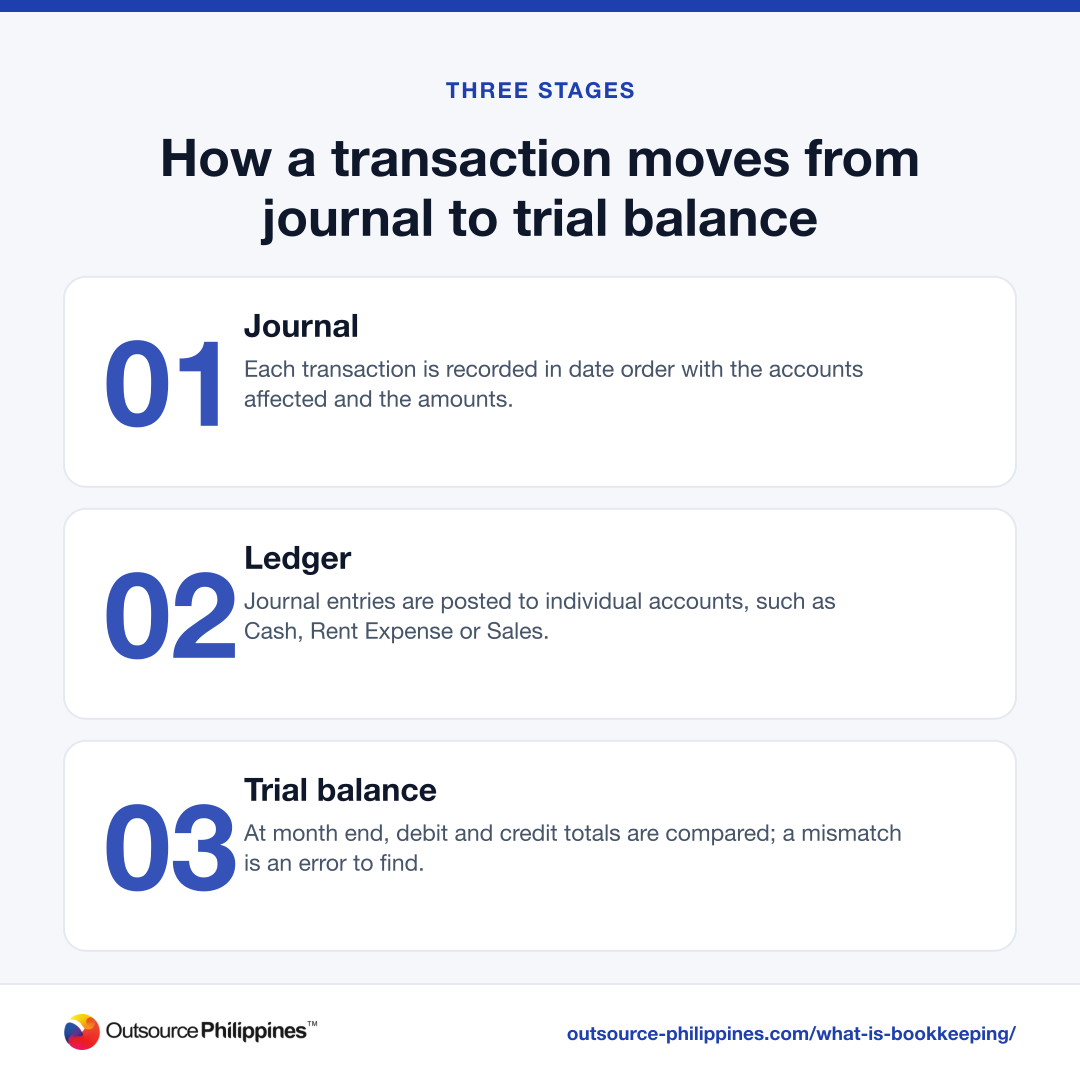
Entries move through three stages:
- 1Journal
Each transaction is recorded in date order with the accounts affected and the amounts.
- 2Ledger
Journal entries are posted to individual accounts, such as Cash, Rent Expense or Sales.
- 3Trial balance
At month end, debit and credit totals are compared; a mismatch is an error to find.
Which Financial Statements Come From Bookkeeping?
The ledger feeds the three statements that owners, lenders and tax preparers read.
| Statement | What It Shows | Period Covered |
|---|---|---|
| Income statement (profit and loss) | Revenue, expenses and net income | A month, quarter or year |
| Balance sheet | Assets, liabilities and owner's equity | A single date |
| Cash flow statement | Cash in and out from operations, investing and financing | A month, quarter or year |
A business can be profitable on the income statement and still run out of cash, for example when customers pay slowly. That is why the cash flow statement matters as much as profit.
Which Bookkeeping Software Do Small Businesses Use?
Most small businesses now keep their books in cloud software that imports bank and card transactions automatically. The common choices:
- Accounting software: QuickBooks, Xero and Zoho Books handle the ledger, invoicing, bills, bank reconciliation and standard reports.
- Lighter tools: Wave and FreshBooks suit freelancers and very small businesses that mainly need invoicing and expense tracking.
- Spreadsheets: Excel and Google Sheets still work for very simple single-entry books, but they have no audit trail and no automatic bank feed.
- Receipt and expense apps: Expensify and similar apps capture receipts on a phone and send them to the accounting software.
Software handles the data entry; people still decide which account a transaction belongs in and investigate anything that doesn't match. Many teams pair these tools with digital process automation for approvals and document routing.
What Are the Best Practices for Accurate Bookkeeping?
These habits prevent most year-end problems:
- Separate business and personal accounts, as IRS Publication 583 advises, and never pay personal costs from the business account.
- Record transactions weekly, not at year end, while receipts and context are fresh.
- Connect bank feeds so card and bank transactions flow into the software daily, then review and categorize them.
- Reconcile every bank and card account monthly. Match the statement balance to the ledger and investigate every difference, such as a missing deposit or a duplicate charge.
- Keep receipts and supporting documents for the periods in the IRS table above, scanned and stored with the transaction.
- Split duties. The person who enters bills should not be the only person who approves and pays them.
- Close the books each month with a short checklist: reconcile, review receivables and payables, run the trial balance, and send statements to the owner.
What Qualifications Should a Bookkeeper Have?
No license is required to keep books in the US, so check skills directly when you hire or outsource. Look for:
- Software skill in the package you use, such as QuickBooks or Xero, including bank rules and reconciliation
- Double-entry knowledge: the candidate can explain which accounts a transaction affects and why
- Month-end routine: reconciliations, accruals and a trial balance without being prompted
- Payroll and sales tax basics for the states where you operate
- Optional certification, such as the Certified Bookkeeper designation from the American Institute of Professional Bookkeepers
Tax work beyond bookkeeping calls for other credentials. An enrolled agent holds what the IRS calls the highest credential it awards to tax professionals and can represent taxpayers before the IRS. Most become enrolled agents by passing the three-part Special Enrollment Examination; certain former IRS employees qualify through their experience. Audits of financial statements are done by CPAs.
The job itself is changing. The BLS projects employment of bookkeeping, accounting and auditing clerks to decline 6% from 2025 to 2035 as software takes over routine entry, which leaves more of the role in review, reconciliation and exceptions.
Should You Keep Bookkeeping In-House or Outsource It?
Keep it in-house if transactions are few and the owner has a few hours a week to spare. Outsource when entries fall behind, month-end close takes more than a few days, or a full-time hire would cost more than the volume justifies. An outsourced bookkeeper works in your own accounting software, so you keep the data and the logins.
Outsource Philippines™ provides dedicated bookkeeping staff who work only on one client's account from a supervised office in the Philippines, handling data entry, reconciliations, payables and month-end reports (but not receivables collections).
Frequently Asked Questions
What Does a Bookkeeper Do Each Week?
A bookkeeper enters or reviews bank and card transactions, records bills and customer invoices, matches payments to invoices, files receipts, and flags anything unusual to the owner. Each month they reconcile every account, run the trial balance and prepare reports for the accountant or owner.
Is Bookkeeping the Same as Accounting?
No. Bookkeeping records transactions; accounting interprets them. A bookkeeper keeps the ledger accurate day to day, while an accountant prepares financial statements and tax returns, makes adjusting entries and advises on budgets, cash and tax planning.
Do Small Businesses Need Double-Entry Bookkeeping?
Most do. Single-entry books can work for a sole proprietor with simple cash sales, but any business with inventory, loans, credit sales or several accounts needs double-entry to produce a balance sheet and catch errors. QuickBooks, Xero and similar software use double-entry by default.
How Long Should a Business Keep Bookkeeping Records?
The IRS standard is 3 years for most returns, 4 years for employment tax records, 6 years if income was underreported by more than 25%, and 7 years for bad debt or worthless securities claims. Keep records indefinitely if a return was not filed.